
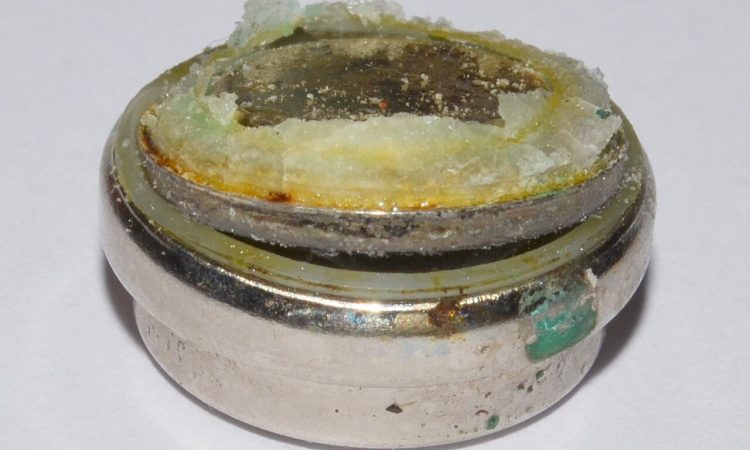
Coin cells fade quietly, and the save goes with them. Working in the right order gets you a backup, the correct cell and a cartridge that holds progress again.
Short version
- Battery-backed cartridges keep saves in SRAM, which holds data only while a 3 V coin cell soldered inside the shell has power.
- One repair community estimates 5 to 9 years of battery life, and notes that many of these cartridges are 10 to 30 years old.
- A USB cartridge reader can copy the save out as a .sav file and write it back after the swap, but lifting one battery tab erases it.
- The marking on the board decides the cell type; a CR2025 is 20 mm wide and 2.5 mm thick, and a CR2032 fits some Game Boy carts but sits 0.7 mm thicker.
- A new cell should read around 3.2 to 3.3 V at the solder points, and a cartridge that still loses saves usually has a cracked solder joint.
A cartridge that boots fine and then forgets everything the moment you switch the console off is not broken in any mysterious way. Plenty of older games keep their saves in SRAM, memory that holds data only while a small 3 V coin cell soldered inside the shell keeps feeding it power. When that cell fades, the save goes with it, and lifting the battery out for a swap erases whatever is left. Here is the order to work in if you want to keep the file.
Stage 1: Spot the Warning Signs Before a Save Disappears
Battery-backed games tend to fail in a few recognizable ways. The game boots and plays, your save is gone, and a new save vanishes again the next time you power off. Some titles announce that the internal battery has run dry, while others simply show a frozen in-game clock.
Age explains most of it. One repair community puts typical battery life at 5 to 9 years, and notes that many of these cartridges are 10 to 30 years old. Titles with an internal clock, such as Pokémon Gold and Silver, drain the cell faster than most.
Not every dead battery costs you a save. In Pokémon Ruby, Sapphire and Emerald the save sits in flash memory that needs no power, and the cell only runs the in-game clock, so time-based events stop while your file stays intact. Switch game cards store no save data at all; that sits in the console’s system memory.
What to have ready: the cartridge, a console you trust and a written note of exactly what you saw. “Clock stopped but saves are fine” points somewhere very different from “everything is gone.”
Stage 2: Back Up What You Can While the Cartridge Still Works
If the cell is weak rather than dead, the save can still be rescued. A USB cartridge reader pulls the file off as a .sav and writes it back after the swap, which is the clean way to carry progress through a battery change. If the save is already gone, skip this stage and go straight to the shell.
There is a second method, and it is not for beginners. You can hold power on the battery pads with a spare cell or another source while you remove the old one, which keeps the SRAM alive, but the repair source that describes it also calls the trick dangerous and says to try it only if you know what you are doing. A reader costs less than a ruined board.
Have a folder ready for the dump before you start, and name it with the game, the cartridge and the date. A file called save01.sav will not tell you much later. Our guide to backing up game progress on every platform covers where those files should live once you have them.
Stage 3: Confirm the Battery Type and Cartridge Case Type
Open nothing until you know which cell you need. The marking on the board is the authority, because the fitted battery varies by game and by board revision, so a guide written for one copy can be wrong for yours. A coin cell’s name carries its dimensions: CR2025 means 20 mm across and 2.5 mm thick. All of these cells deliver 3 V and differ in size and capacity.
| Cell | Where it turns up | What to know |
|---|---|---|
| CR2025 | Original Game Boy titles, including Pokémon Crystal | 20 mm wide, 2.5 mm thick |
| CR1616 | Pokémon Yellow and the GBA Pokémon games, some Game Boy cartridges | Smaller cell; on GBA titles it runs only the clock |
| CR2032 | Fits some Game Boy cartridges in place of a CR2025 | 0.7 mm thicker and lasts longer, but sits tight; if the shell bulges when screwed shut, use the printed type |
If the marking is worn or missing, treat the cartridge as unknown rather than guessing. Have the cell type written down, and order a tabbed cell rather than a loose one.
Stage 4: Open the Cartridge Without Damaging the Shell
The screws are not Phillips. Game Boy, Game Boy Color, SNES and N64 cartridges use a 3.8 mm gamebit, and Game Boy Advance cartridges take a tri-wing driver. Neither is a standard bit, and a normal screwdriver set will chew the head before it turns it.
With the screw out, slide the front face of the shell down to expose the board rather than prying at the seam. Clear a spot on the desk and use a small dish for the screw, because these are easy to lose and awkward to replace.
Tools cost more than the part they touch. If you are weighing a repair against other ways to play, the real cost of retro hardware is worth reading before you buy an iron for a single cartridge.
Stage 5: Remove the Old Cell and Fit the New One
Get the old cell out. Apply flux to the two soldered tabs, heat one with the iron and lift it with tweezers, then repeat on the other. Keep the iron on each joint only as long as it takes, since too much heat on the board causes damage.
Heads up
On Game Boy, Game Boy Color, SNES and N64 cartridges the save depends on the battery. Lift one tab and the file is gone, so back it up first or accept the loss.
Look over the board. Factory soldering on these boards is not always reliable, and a cracked joint on a chip leg is a common reason a cartridge still refuses to save after a fresh cell. Check every joint, and reflow any that look dull or cracked, working out from the battery.
Fit the replacement. Match the positive side to the positive marking on the board and the negative to the negative, then solder both tabs. If you expect to do this again in a few years, a battery holder replaces the soldered connection with a socket and spares the board the next round.
Stage 6: Test the Save, Label the Cartridge and Record the Swap
Before the shell goes back on, put a multimeter on the tabs in DC voltage mode. A healthy new cell reads around 3.2 to 3.3 V at the solder points, a reading near 1.5 V means something is wrong, and a negative number usually means the probes are reversed.
Line the board up with the shell, tighten the screw and boot the game. Make a save, power the console off, then switch it back on and check the file survived. If a fresh cell still loses saves, suspect the soldering rather than the battery, particularly the small chip nearest the battery, which is where one repairer tracked down the failing joint.
Record the cell type, the swap date and whether you fitted a holder, on a label inside the shell or in a note kept with the game. Have the label and pen ready before you close it up. The next person to open this cartridge, who may well be you, will be glad of the detail.
Stage 7: Dispose of the Old Battery and Plan the Next Check
Coin cells do not belong in household trash in many places. Check with your local waste or recycling authority about household hazardous waste, and do not puncture, crush or heat the old cell on its way out.
Plan the next inspection while you remember the details. These cells are rated for years rather than decades, so a voltage check every couple of years on the cartridges you care about beats finding a dead battery the day a visitor asks to see an old save. Games with clock features are the ones to check first, and a spare screwdriver bit makes the job quick.
If the cartridge turns out to be a copy rather than an original, our comparison of reproduction and original cartridges explains what the board is telling you, and why some shells are not worth a new cell.
Quick questions
How can I tell my cartridge battery is dying?
Saves vanish after you power off, the game reports that the internal battery has run dry, or the in-game clock stops. A fresh save that disappears again is the same warning.
Will I lose my save when the battery is replaced?
On Game Boy, Game Boy Color, SNES and N64 cartridges, yes, unless you read the file out with a cartridge reader first. Lifting a single tab cuts power to the save memory.
Which battery does my cartridge need?
Go by the marking on the board, because the fitted cell varies by game and board revision. Original Game Boy titles often use a CR2025, while Pokémon Yellow and the GBA Pokémon games use a smaller CR1616.
Do the GBA Pokémon games lose saves when the battery dies?
Not in Ruby, Sapphire and Emerald, where the save sits in flash memory and the cell only runs the clock. Time-based events stop, but your file stays intact.
Store policies, subscription terms and platform features change often. This guide is general information for players in the U.S., not legal advice; check the current terms on the store’s or platform’s own help pages before relying on them.